 AFM Studio
Jejak Penanaman
 Jejak Penanaman
A check-in app for IKN tree-planting events that proves each participant was on site with a geofenced selfie
- check-in radius, set per event
- 50–5,000 m
- ways in, including guest walk-ups
- 3
- screens for participants and admins
- 28
- GPS decimal places stamped on photos
- 7
On this page
The problem
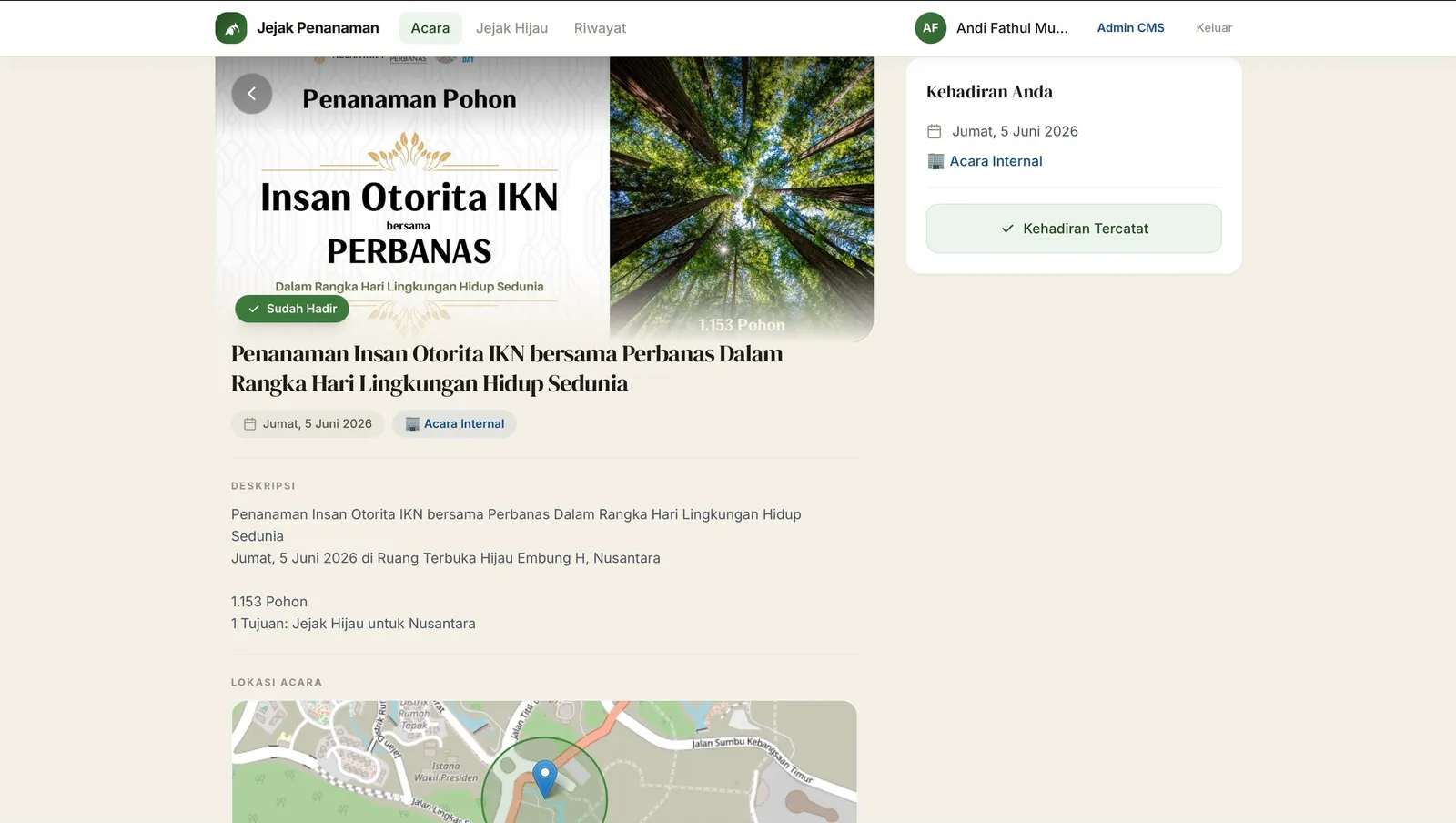
Otorita IKN runs tree-planting events in Nusantara, the new capital, for its own employees and for the public. Attendance used to live on paper forms and spreadsheets. Nobody could tell whether a participant was actually on site. There was no central record of who came to which event, no log of which species went into the ground, and no photos.
Three kinds of people had to fit into one system. Employees sign in with their government account. Members of the public register with an email address. At open events, some people simply walk up with no account at all. Admins needed to create events, place them on a map, track registrations and export attendance reports.
What I built
Check-in needs a selfie taken at the site
To check in, a participant takes a selfie and shares their location. It has to fall inside a radius the admin sets for each event, from 50 to 5,000 metres around a pin on the map. The phone checks the distance first and tells the participant how far away they are. The server checks it again, so nobody can fake a check-in by calling the API directly. Photos are compressed on the phone to stay under 1 MB.
Every photo carries its own proof
Before upload, the phone stamps each selfie and plant photo with the date, the local time in WITA and GPS coordinates to seven decimal places. The same location is also written into the photo's metadata. The server does no image processing at all. The proof travels with the file, so a photo downloaded later still shows where and when it was taken.
One attendance record, three ways in
Employees sign in through the government's single sign-on. Their names and work units arrive in inconsistent formats, so I clean them up on login. Public participants register by email and receive a generated password. At open events, a walk-up participant can check in without registering. The system creates a lightweight guest account on the spot, and permissions for everyone else stay the same.
I added plant records halfway through
Species tracking wasn't in the original spec. I added it mid-project to support IKN's reforestation records, without breaking the existing data. Each check-in can list several species, with a count, the sapling's age in months and photos. A personal "Jejak Hijau" page shows a participant everything they have planted across every event.
Public events get tickets and per-institution quotas
Public events issue a QR ticket per registration. Admins scan tickets at the gate with a phone camera, and each result plays a sound. Quotas started as one number per event. When government institutions asked for their own allocations, I made per-institution quotas and t-shirt sizes an option on each event. Simpler events keep a single quota. Participants can also take a selfie in a branded IKN frame and download it to share.
Admins can fix what the field breaks
Outdoor events lose signal. Admins can record attendance on a participant's behalf, set the time it happened, and add plant photos to an existing record later. A superadmin role manages the admins and can promote a public user to employee status. That locks the user's unit details, so a later sign-in can't overwrite the correction.
Result
Jejak Penanaman is in production and has been used at IKN tree-planting events since mid-2026. I built it between April and July 2026, and production was running by June. One codebase handles two kinds of event. Internal events are sign-in only, with no registration. Public events have registration, quotas, QR tickets and walk-up guests. Admin dashboards break attendance down by directorate and deputy office, with a ranked table for internal reporting. The app has 28 screens across the participant and admin sides.
Under the hoodTechnical detail for engineers
- Django REST Framework API with a React (Vite) single-page app and JWT access and refresh tokens. Three Docker Compose services: PostgreSQL, Django on Gunicorn, and React on Nginx.
- Geofence: a Haversine distance check on the client for instant feedback ("you are 340m away"), repeated in the attendance submission view against the event's stored coordinates.
CameraCaptureuses the MediaDevices API, draws the frame to a hidden canvas and compresses it to a maximum of 1024px at JPEG quality 0.7. iOS Safari only allowsgetUserMedia()from a direct user gesture, so the camera starts on a button tap, never on page load.- Photo stamps are drawn onto the canvas before upload. GPS is written into EXIF on the client with
piexifjs. - Employee sign-in is Keycloak OIDC through
mozilla-django-oidcand a customOIDCAuthenticationBackendthat fixes ALL-CAPS names and work units split across several claim fields. The OIDC config is served by a backend endpoint at app boot, so one Docker image works in dev and prod without a rebuild. - Public registration emails go out through SendGrid. A self-service password reset uses a time-limited emailed token.
- Guest check-in ("absen tanpa login") is an anonymous registration endpoint that creates a guest user on demand.
- Ticket codes follow
JP-YYMMDD-NNNand are assigned atomically to avoid collisions. The gate scanner useshtml5-qrcode; tickets render withqrcode.reactand download throughhtml2canvas. - Per-institution segmentation is opt-in through
institution_enabledandtshirt_enabledflags onEvent. EachEventInstitutionrow has a nullable quota (null means unlimited) and its own list of sizes. - A default twibbon frame applies to every event unless the event has its own. Frames are composited on the client with canvas.
- The admin event form uses
react-leafletwith a draggable pin and a radius slider. - 5 Django apps (
accounts,events,attendance,flora,twibbon), 13 models, about 90 API URL patterns and 28 frontend pages. About 11,200 lines of JSX/JS and 3,400 lines of Python, 78 commits from 1 April to 3 July 2026.
Screenshots
Hiring, or building something similar?
I'm open to full-time roles and select freelance work.